The Expert Intern - AI coding assistance

A reflection on a day's work with AI coding assistance
AI code assistance is all the rage in software development. I decided to spend a day working with IntelliJ's Junie AI in "chat mode", to build a clean sheet project, to analyze the sort of technical decisions that the AI made, where it went wrong and what it struggled with.
What I found
Development went fast. Really fast. I'd estimate on my own with no AI the project would have taken 5-7 days. Qualitatively, the UI was a big improvement. Left to my own devices, the UI and graphs would have been... functional. Junie was able to generate what I'd consider a production-quality user interface, typically in a single pass per page.
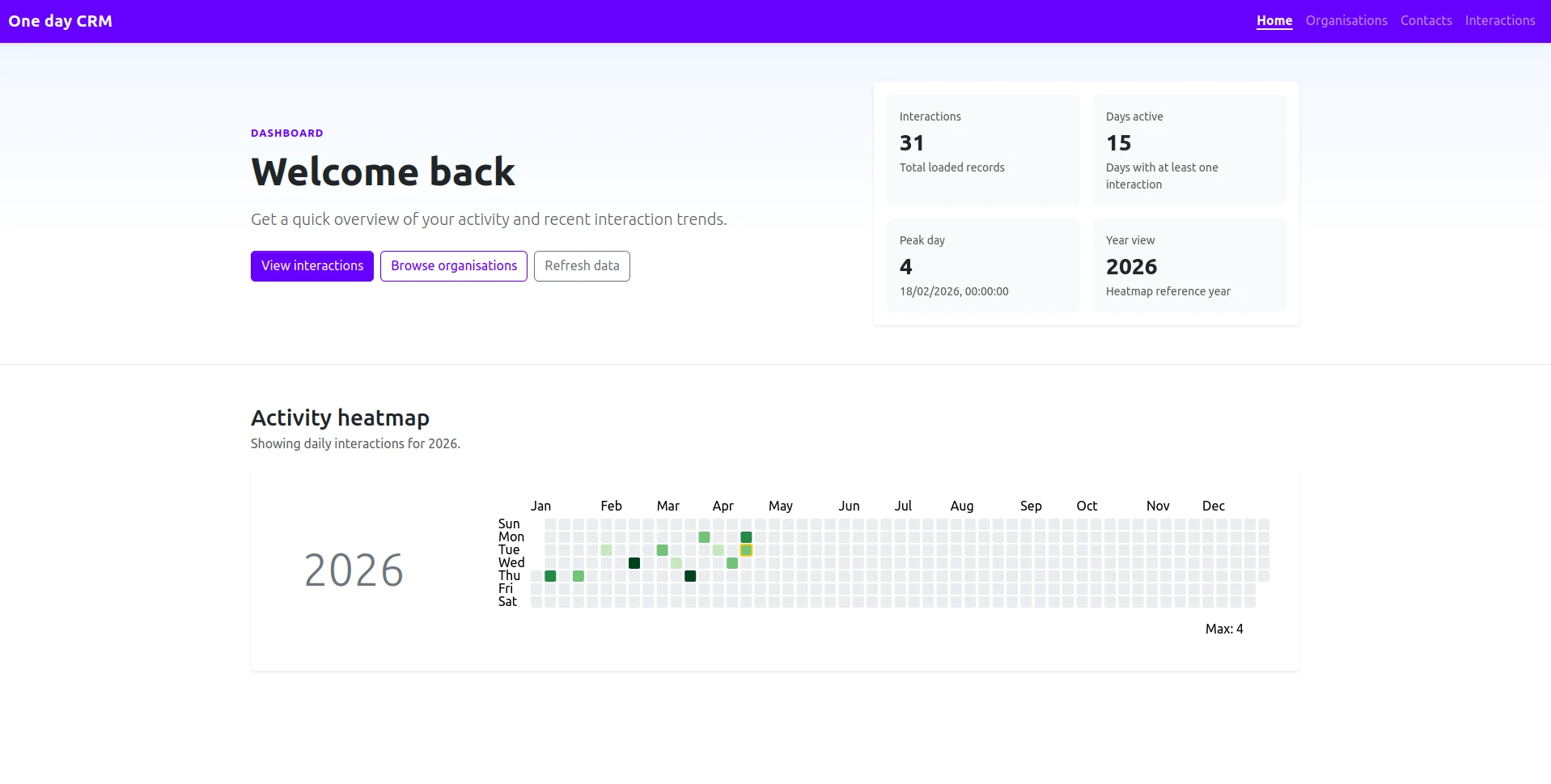
Here's a screenshot of the final product.
On the positive side;
-
Development speed was high enough that for a good amount of the day I was focused on "how I want this to work" and not the specifics of implementing that on a fine-grained level.
-
Junie really shone in certain bug fix scenarios (e.g. when known-but-obscure issues cropped up). Things like angular change detection failing in an odd edge case. Or a silent failure in a bean naming quirk in Spring.
-
In 3 cases during the day, Junie solved a difficult issue in a single prompt-and-reply interaction - most impressively a single pass implementation of an Angular D3 integration rendering a Github style calendar heatmap.
On the negative side;
-
Junie would hit points it couldn't comfortably get past... that would break the "flow" type state of our interaction. I was sometimes able to prompt Junie to fix the issue, and sometimes I had to fix it myself.
-
As the code grew, the interaction biased towards heavier prompting and more manual fixes. This was particularly true for multiple interacting components.
The Process
I had a clear plan of what I wanted the project to do (a toy CRM) how I wanted the project to work, and so I adopted an "architect working with engineer" approach.
Tech stack;
- Java backend (Spring Boot, Spring Data, Hibernate)
- Maria DB (Schema hand made prior to project start)
- Angular (Standalone mode, Sass, Bootstrap, D3)
I hand created the schema and bootstrapped both the backend and frontend from existing tools (intellij project wizard for Spring, Angular CLI for the front end).
From there I used the Junie AI in chat mode, prompting for each feature addition, bugfix and change. Sort of a vibe code flow, but one where I was in the loop, reading and applying the changes one by one.
Observations
I observed a few behaviors of particular note.
Junie IDE integration
Using Junie I found the IDE integration to be a little flaky, creating files in the wrong location, requiring me to actually open each file Junie wanted to modify (or create) and then apply the changes once selected. This too only worked about 70% of the time. I'm sure this will be fixed in future versions.
My workflow ended up being;
- create the relevant files
- open them in the IDE
- prompt Junie to add either a specific feature or a general implementation (say of a repository)
- apply the changes (either with the apply feature, copy-paste, or read and implement the changes myself)
Coding behaviour - Hack mode activated!
Junie struggled to generate what I'd consider "good" approaches in several cases – seemingly out of the blue. Despite being told about an efficient report endpoint (along with all relevant connection details) Junie opted more than once to fetch all records and process them in the UI.
After 3 prompts I gave up asking Junie to fix this and addressed it myself.
Architecture - A preference for big files
I found that Junie has a preference for "one big file" rather than separating files, and separating concerns. This will probably improve over time, but right now I found I had to be very aware of the contents and changes, using my own intuition for the point where I'd ask "hey Junie, can you split this element out to a component?".
Architecture - Consistency
I found that Junie was reasonably consistent in structuring components, but would sometimes inexplicably change the structure. For example, suddenly adopting inline templates when asked to modify a component.
This is reasonably easy to push back against with prompting (or manual fixes) - but something to watch for.
Bug fixing behaviour - If in Doubt, Change Stuff!
Situations where subtle bugs caused unexpected results often caused Junie to double down. A cycle along the lines of;
- 👤 Hey, this doesn't work, could you take a look, I think it might be "X"
- 🤖 This should work but doesn't... here's a rewrite using a different approach.
- 👤 bug is still present
- repeat
How I handled this - while instructions to be analytical helped, the ultimate solution was to investigate the issue myself and fix it by hand.
Bug fixing behaviour - Hack mode activated again!
Unless otherwise prompted, I've noticed a tendency of Junie to lean towards hacky solutions to problems - particularly if the first-pass solution either failed or was rejected. This feels like a prioritisation of "working scenario" over generalising solutions and improving the code base.
For example issues with date handling within Spring endpoints prompted a cycle of "just parse the string by hand" until further prompting lead to using more appropriate parameter types (OffsetDateTime vs LocalDate)
In terms of handling this, it's easy enough to give a secondary prompt, the real trick is spotting it happening.
Conclusion
It's an amazing tool... but per the title of this post, my experience of using Junie for code generation was an odd mix of feeling like I was working with a "subject expert" on the languages and tools, that nonetheless lacked some of the contextual awareness and self-awareness* that I'd expect from a human with 6+ months of dev experience.
*(in the sense of "am I unsure about this approach?" and "is what I'm doing here repetitive, guesswork, etc")
Hence the title, I consider Junie in its current form to act like a mix of expert and intern. It is very productive, very helpful, but not something I'd use without being keenly watchful of the changesets.
AI coding is a great tool for software development but requires careful guidance and oversight to ensure code quality and appropriate approach. I'd certainly be careful of junior developers becoming over-reliant on it (rather than sharpening their skills), and I suspect it could instill some bad habits if used unsupervised.